logologo
  • Store
  • Events
  • Updates
  • News
    • Loading...
    • Discover
    • Browse
    • Rewards
    • FAQ
    1. Browse
    2. Mobile Game
    3. Mobile Legends: Bang Bang
    Merdeka Exclusive Emotes
    Mobile Legends: Bang Bang

    Mobile Legends: Bang Bang Top Up

    Play with the world!

    4.9979.9k+ Reviews

    Mobile Legends: Bang Bang is the number #1 MOBA game developed by Moonton. Pick your hero and join your teammates to defeat your opponents in the land of dawn.

    Mobile Legends: Bang Bang
    Need help?UpdatesAbout
    • Telegram Channel - DearPlayers

    Sitemap
    • Store
    • Catalog
    • News
    • Events
    • Updates
    • Trending Now
    • Promotion
    • Newly Added
    • Latest Update
    • FAQ
    • System Status
    • About Us
    • Get in Touch
    Resources
    • Shopee @Cielolew
    • Join Our Telegram Channel
    • Partnership
    Legal
    • Terms of Service
    • Privacy Policy
    • Refund Policy

    ©2025 CIELOLEW STUDIO (202203102712) (KT0520590-V)
    All Rights Reserved.DearPlayers.com is a registered trademark of Cielolew Studio. All product names, logos, brands, and other trademarks featured or referred to within this website are the property of their respective trademark holders. These trademark holders are not affiliated with Cielolew Studio, nor do they sponsor or endorse our services. Any unauthorized use of these trademarks is strictly prohibited.
    NO.99 Kampung Sungai Kertam, Maran, Pahang, 26500, Malaysia | +60138934345

    DearPlayers Status
    Rate us on Trustpilot
    Brand logo Dearplayers.com

    Top Up ML Philippines: Buy Mobile Legends Diamonds

    Buy Mobile Legends diamonds with a direct ML top up in the Philippines. Enter the receiving account's User ID and Zone ID, confirm the returned player details, choose a Diamond package or One Time Weekly Diamond, and pay the PHP total shown at checkout. You do not need to share the Mobile Legends password or login.

    The current checkout displays Maya/GCash/QR PH, Bank Transfer, and card payment through Visa and Mastercard. Diamonds are normally credited soon after successful payment confirmation, although a pending payment, incorrect account details, or a game-side delay can extend processing.

    Check before paymentConfirm the User ID, Zone ID, returned player details, package, and final PHP total. The checkout total is the final amount charged by DearPlayers. Direct TM, Globe, Smart, and TNT load billing is not supported.

    Region Notice: MLBB (PH) Packages and What You Receive

    MLBB (PH) packages are intended for Philippines-region accounts, so this product cannot top up every regional account. Moonton's region restrictions can change and regional pricing may vary, so what you receive depends on the account's region at the time of processing.

    For non-PH accounts, your order may be converted to an alternative regional package due to Moonton's region restrictions. You may receive approximately 1%–36% fewer Diamonds due to regional price differences.

    For non-PH accounts, the estimated converted amounts are:

    MLBB (PH)Non-PH (Est.)Conversion ratioDifferenceRecommendation
    2214≈63.6%-8
    5642≈75.0%-14
    11298≈87.5%-14★★
    223210≈94.2%-13★★★
    336312≈92.9%-24★★★
    570527≈92.5%-43★★★
    11631071≈92.1%-92★★★
    23982162≈90.2%-236★★
    60425535≈91.6%-507★★

    Stars show how the estimated converted amount compares with the PH package: ★★★ = 92% or more, ★★ = 85–91.9%; blank = below 85%.

    Conversion amounts are estimates only and may vary depending on the region, available packages, and pricing at the time of processing.

    Why Top Up ML on DearPlayers Philippines?

    Final PHP Price
    The checkout total is the final DearPlayers charge. No additional DearPlayers service, administration, or payment-processing fee is added after payment.
    Philippines Payment Options
    Use Maya or GCash through QR PH, Bank Transfer, or Visa/Mastercard when the method is displayed for your order.
    No Game Password
    Direct delivery uses the receiving account's User ID and Zone ID. DearPlayers does not ask for the game password or login credentials.
    Failed-Order Refund Support
    If delivery cannot be completed and the failure is confirmed, the refund request is sent through the original payment channel. Keep the Order ID so support can trace it.

    ML Diamond Packages, Weekly Option, and First Top Up Bonus

    The product selector shows each package name, current PHP price, discount when applicable, and Reward Points before payment. Standard packages currently range from 10 Diamonds + 1 Bonus to 5035 + 1007 Bonus, with One Time Weekly Diamond listed separately. Players may also call Mobile Legends diamonds ML dias; both terms refer to the Diamond packages shown on this page.

    The First Top Up Bonus tab currently shows four packages marked 2x: 50 Diamonds + 5 Bonus, 150 + 15 Bonus, 250 + 25 Bonus, and 500 + 65 Bonus. The checkout states that the 2x reward applies to the first purchase of that variant and that terms apply. Confirm that the tab, marker, and selected package are still displayed for your receiving account before relying on the offer.

    Package availability, prices, discounts, and Reward Points can change. Bonus Diamonds and the Weekly option may follow different in-game recharge-event rules, so check the current event terms inside Mobile Legends when buying for a specific task.

    How to Top Up or Recharge ML Diamonds

    1. Enter the receiving account's Mobile Legends User ID and Zone ID.
    2. Confirm that the checkout returns the correct player details.
    3. Select a standard Diamond package, an eligible First Top Up Bonus package, or One Time Weekly Diamond.
    4. Choose Maya/GCash/QR PH, Bank Transfer, or Visa/Mastercard from the methods shown.
    5. Review the account, package, payment method, and final PHP total, then select Top Up Now.

    The order is processed for the account linked to the submitted IDs. Check both numbers before paying because a completed direct top up cannot simply be moved to another game account.

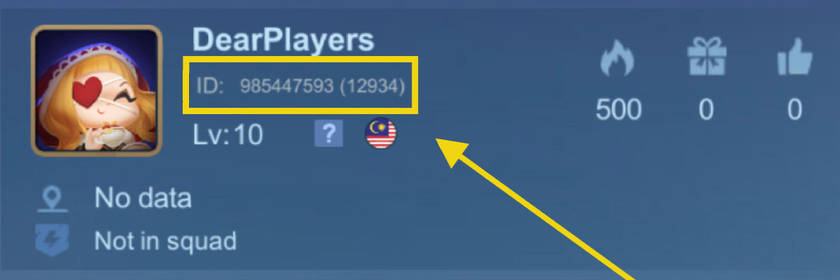
    How to Find Your MLBB User ID and Zone ID

    1. Open Mobile Legends: Bang Bang on the receiving account.
    2. Tap the profile avatar in the upper-left corner.
    3. Find the account number shown in a format such as 12345678 (1234).
    4. Use the first number as the User ID and the number in parentheses as the Zone ID.

    Mobile Legends profile showing where to find the User ID and Zone ID

    Verify the recipientConfirm the returned player details before payment. A wrong User ID or Zone ID can cause validation to fail or send the order to the wrong receiving account.

    How to Check the Diamonds Credited

    After the order is completed, verify delivery in the receiving account:

    1. Open Mobile Legends: Bang Bang.
    2. Open Settings.
    3. Select Record to open the Activity Record.
    4. Select Diamonds.
    5. Review the latest Diamond entry and balance change.
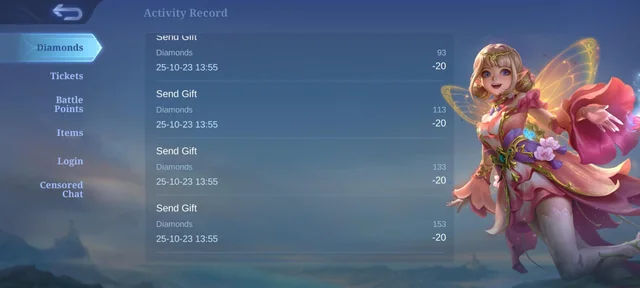
    MLBB Activity Record showing where to check the Diamonds credited

    Delivery recordSettings → Record → Diamonds shows the receiving account's in-game credit record. Keep the Order ID until the Diamond entry or Weekly option appears.

    Delivery Time and Missing ML Diamonds

    ML Diamonds are normally credited soon after successful payment confirmation. Processing can take longer when the wallet, bank, or card payment is pending or under review, the submitted account details need attention, or the game service is delayed.

    If a paid order is still incomplete, check the order status and Settings → Record → Diamonds first. Then contact DearPlayers support with the Order ID. Do not place a duplicate order while the first payment is pending.

    Final Price and Refunds for Failed ML Top Ups

    The PHP total shown at checkout is the final amount charged by DearPlayers. DearPlayers does not add another service, administration, or payment-processing fee after you confirm the order.

    If the receiving account cannot be topped up and the delivery failure is confirmed:

    1. DearPlayers submits the refund request to the payment channel within 24 hours.
    2. The payment channel returns the refund to the original payment method.
    3. DearPlayers does not deduct a payment-processing fee from the refunded amount.

    The bank or payment provider controls when the refund appears. It usually takes 3-7 business days after the request is submitted. Support can provide the refund confirmation issued by the payment channel when you contact them with the Order ID.

    This process applies to confirmed failed delivery. A successfully completed top up sent to the submitted account details is not automatically reversible. Read the DearPlayers refund policy for the full terms.

    MLBB Account and Region Eligibility

    This product is intended for Philippines-region Mobile Legends accounts. The checkout checks the receiving account after you enter the User ID and Zone ID.

    For accounts not registered in the Philippines, MLBB (PH) packages may be converted to an alternative regional package due to Moonton's region restrictions, and you may receive approximately 1%–36% fewer Diamonds — see the conversion table in the Region Notice above.

    If the account is registered in Indonesia, use Mobile Legends Diamonds Global instead. Stop before payment if the returned player details are unexpected or the page reports that the account is not eligible.

    Game Features & Community

    Join your friends in Mobile Legends: Bang Bang, the brand new 5v5 MOBA showdown, and fight against real players! Choose your favorite heroes and build the perfect team with your comrades-in-arms! 10-second matchmaking, 10-minute battles. Laning, jungling, pushing, and teamfighting, all the fun of PC MOBA and action games in the palm of your hand!

    Mobile Legends: Bang Bang, the fascinating MOBA game on mobile. Smash and outplay your enemies and achieve the final victory with your teammates!

    Your phone thirsts for battle!

    Features:
    • Classic MOBA Maps & 5v5 Battles
      Real-time 5v5 battles against real players. 3 lanes, 4 jungle areas, 2 bosses, 18 defense towers, and endless fights, everything a classic MOBA has is here!
    • Win with Teamwork & Strategy
      Block damage, control the enemy, and heal teammates! Choose from Tanks, Mages, Marksmen, Assassins, Supports, etc. to anchor your team and be match MVP! New heroes are constantly being released!
    • Fair Fights, Carry Your Team to Victory
      Just like classic MOBAs, there is no hero training or paying for stats. Skill and strategy are all you need to be able to win the intense competition on this fair and balanced platform. Play to Win, not Pay to Win.
    • Simple Controls, Easy to Master
      With a virtual joystick on the left and skill buttons on the right, 2 fingers are all you need to become a master! Autolock and target switching allow you to last hit to your heart’s content. Never miss! And a convenient tap-to-equip system allows you to buy equipment anywhere on the map so you can focus more on the thrill of battle!
    • 10 Second Matchmaking, 10 Minute Matches
      Matchmaking only takes 10 seconds. And a match only takes 10 minutes. Gloss over the quiet early-game leveling up and jump right into the intense battles. Less boring waiting and repetitive farming, and more thrilling actions and fist-pumping victories. At any place, at any moment, just pick up your phone, fire up the game, and immerse yourself in the heart-pounding MOBA competition.
    • Smart Offline AI Assistance
      A dropped connection could mean hanging your team out to dry in an intense match, but with Mobile Legends: Bang Bang’s powerful reconnection system, if you get dropped, you can be back in the battle in seconds. And while you’re offline, our AI system will take control of your character temporarily to avoid a 4-on-5 situation.

    Recent Changes

    Discover the revamped hero Kaja, a highly mobile control Support who masters Primal Lightning to soar freely across the battlefield. The MLBB × Jujutsu Kaisen event is back for a limited time! Enjoy collab skins of Yuji Itadori, Megumi Fushiguro, Satoru Gojo, and Nobara Kugisaki, along with other event items. Arcade Mode: Chaos Clash returns for a limited time, offering new gameplay thrills!

    Frequently Asked Questions (FAQ)

    How do I top up or recharge ML Diamonds in the Philippines?

    Enter the receiving account's User ID and Zone ID, confirm the returned player details, select a Diamond package or One Time Weekly Diamond, and choose a payment method shown at checkout. Review the PHP total before selecting Top Up Now.

    What payment methods can I use for an ML top up in the Philippines?

    The current checkout displays Maya/GCash/QR PH, Bank Transfer, and card payment through Visa and Mastercard. Use the options shown for your selected package because availability can change.

    Can I pay for an ML recharge with GCash or Maya?

    Yes. Select Maya/GCash/QR PH under Wallet Payment and follow the QR PH instructions. Confirm the receiving account, package, and PHP total before completing payment.

    Can I use TM, Globe, Smart, or TNT load for an ML top up?

    No. This product does not support direct carrier billing or mobile load from TM, Globe, Smart, or TNT. Use a wallet, Bank Transfer, or Visa/Mastercard option displayed at checkout.

    How much do ML Diamonds cost, and are there extra fees?

    The price depends on the selected Diamond or Weekly option and the promotion currently shown. The PHP total in the order summary is the final amount charged by DearPlayers; no additional DearPlayers service, administration, or payment-processing fee is added afterward.

    Which First Top Up Bonus packages are currently shown?

    The current tab shows 50 Diamonds + 5 Bonus, 150 + 15 Bonus, 250 + 25 Bonus, and 500 + 65 Bonus with a 2x marker. The checkout states that the 2x reward applies to the first purchase of that variant and that terms apply. Confirm the marker and selected package before paying because eligibility and availability can change.

    Can I buy the Weekly Diamond option?

    Yes. The current selector includes One Time Weekly Diamond. Enter the same User ID and Zone ID used for a Diamond top up, then check the current in-game pass, stacking, and event rules before purchasing.

    How quickly will my ML Diamonds arrive?

    Diamonds are normally credited soon after successful payment confirmation. A pending payment, payment review, incorrect account details, or a game-side delay can extend processing.

    What should I do if my ML Diamonds have not arrived?

    Check the payment and order status, then review Settings → Record → Diamonds on the receiving account. If the paid order is still incomplete, contact DearPlayers support with the Order ID. Do not submit a duplicate order while the first one is pending.

    Where can I check the actual Diamonds credited?

    After completion, open Mobile Legends and go to Settings → Record → Diamonds. Review the latest Diamond entry and balance change in the Activity Record.

    Where can I find my MLBB User ID and Zone ID?

    Open Mobile Legends and tap the profile avatar in the upper-left corner. In an account number such as 12345678 (1234), the first number is the User ID and the number in parentheses is the Zone ID.

    Do I need my Mobile Legends password to buy Diamonds?

    No. Direct delivery uses the receiving account's User ID and Zone ID. DearPlayers does not need the Mobile Legends password or login credentials.

    Which MLBB account regions can use this product?

    This product is intended for Philippines-region Mobile Legends accounts. For accounts registered outside the Philippines, orders may be converted to an alternative regional package with approximately 1%–36% fewer Diamonds — see the conversion table in the Region Notice. For an Indonesia-registered account, use the Mobile Legends Diamonds Global page instead.

    Will I receive fewer Diamonds if my account is not registered in the Philippines?

    MLBB (PH) packages are intended for Philippines-region accounts. For non-PH accounts, your order may be converted to an alternative regional package due to Moonton's region restrictions, and you may receive approximately 1%–36% fewer Diamonds. The estimated conversion table is shown in the Region Notice section on this page.

    What happens if I enter the wrong User ID or Zone ID?

    The account check can fail, or the order can be processed for the wrong receiving account. Confirm both numbers and the returned player details before payment. Stop and correct the information if anything is unexpected.

    What happens if my MLBB account cannot be topped up?

    After the delivery failure is confirmed, DearPlayers submits the refund request to the payment channel within 24 hours. The refund returns to the original payment method without DearPlayers deducting a payment-processing fee. The bank or payment provider controls the posting time, which is usually 3-7 business days.

    If you have questions, contact DearPlayers support with the Order ID to request the refund confirmation issued by the payment channel. This applies to failed delivery; a successfully completed order sent to the submitted account details is not automatically reversible. Read the DearPlayers refund policy for full terms.

    • Sign In / Register
  • gold coin
  • Sign In