Why Top Up Lita Coins on DearPlayers?
DearPlayers gives you a simple way to buy Lita Coins online with User ID checkout and US-friendly payment options.

Use Lita Coins to hire gaming companions in the Lita app for games like Mobile Legends, Valorant, and PUBG Mobile. Enter your User ID, choose a Coin package from $1.99, and complete checkout on DearPlayers.
DearPlayers gives you a simple way to buy Lita Coins online with User ID checkout and US-friendly payment options.
To help us send the Coins to the correct Lita account, please provide your User ID:

Lita connects gamers online. Use Coins to play with skilled companions and make new friends.
Lita Coins are the in-app currency used in Lita. You can use them to hire gaming companions and access related services in the app, including booking sessions with skilled players for games like Mobile Legends, Valorant, and PUBG Mobile.
The available Lita Coins packages are 110, 300, 600, 1000, 2000, 5000, and 10000 Coins, with prices starting from $1.99. Bigger packages give more Coins per dollar.
US buyers can pay with Visa, Mastercard, and PayPal for this product.
No. You only need your User ID for this top-up. Do not share your Lita password, and you can place the order without creating a DearPlayers account.
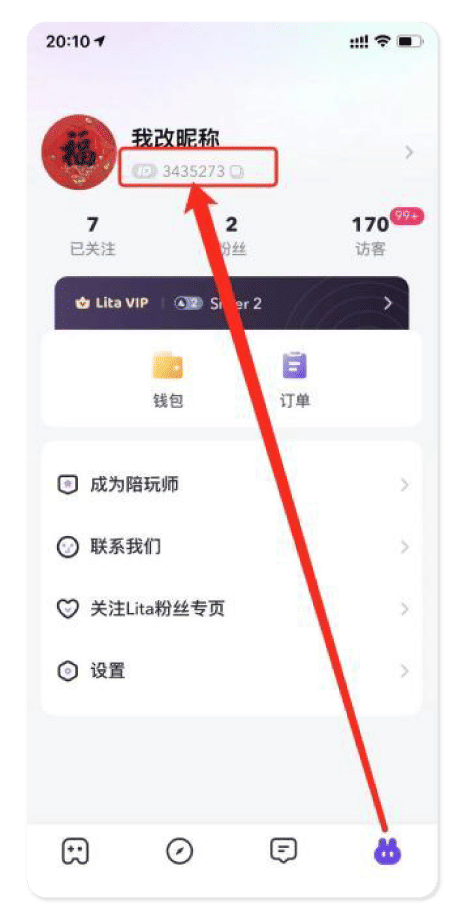
Open the Lita app, go to your Profile page, and look for the User ID displayed under your nickname. Double-check the number before placing your order.
Lita Coins are processed after payment confirmation. Check your balance in the Lita app once your order is complete.
Yes. You can buy Lita Coins for someone else by entering their User ID at checkout. Make sure the ID is correct before you pay.
If the wrong User ID is entered, the Coins will be processed to a different account. Contact support right away. Always double-check your User ID before paying.
Compare the Coin package size, payment method, User ID checkout flow, and support options. DearPlayers lets you top up with your Lita User ID only, without sharing your password.
Check whether your payment was confirmed and verify that the User ID entered was correct. If payment is confirmed and the Coins still are not showing in the Lita app, contact DearPlayers support with your order details.