Choose a UC Pack for Your PUBG Mobile Goal
A 60 UC pack suits a small crate purchase, while 600 + 60 UC is a practical starting point for Royale Pass spending. Larger 1500 + 300, 3000 + 850, and 6000 + 2100 bundles are for players planning premium crates, event spins, or a season of cosmetics.
Compare the pack total, not just the first price: the bonus UC is already named in each bundle.
PUBG Mobile UC Price Malaysia (RM)
PUBG Mobile UC packages with the current listed prices. The checkout shows the current price for every package.
Package prices change with promotions and exchange rates; the checkout page shows the current price before you pay.
Pay for your chosen UC pack with Touch 'n Go, DuitNow, ShopeePay, GrabPay, Boost, Store Credit, Bank Payment, or Cash Payment.
Can I Top Up PUBG UC with Celcom or Digi?
For supported UC packages, checkout may show Celcom or Digi under Telco Payment. Availability depends on the selected package, so use the payment methods shown for your order.
Can I Top Up PUBG UC with Celcom or Digi?
For supported UC packages, checkout may show Celcom or Digi under Telco Payment. Availability depends on the selected package, so use the payment methods shown for your order.
Where to Find Your PUBG Mobile Player ID
Your PUBG Mobile Player ID is a unique number that identifies your account. You need it to top up UC without sharing your password.
Open PUBG Mobile on your device.
Tap your Profile avatar in the top-left corner of the main lobby.
Look for the numeric Player ID displayed below your in-game name on the profile page.
Tap the copy icon next to the ID to copy it to your clipboard.
Paste the Player ID into the DearPlayers checkout form.
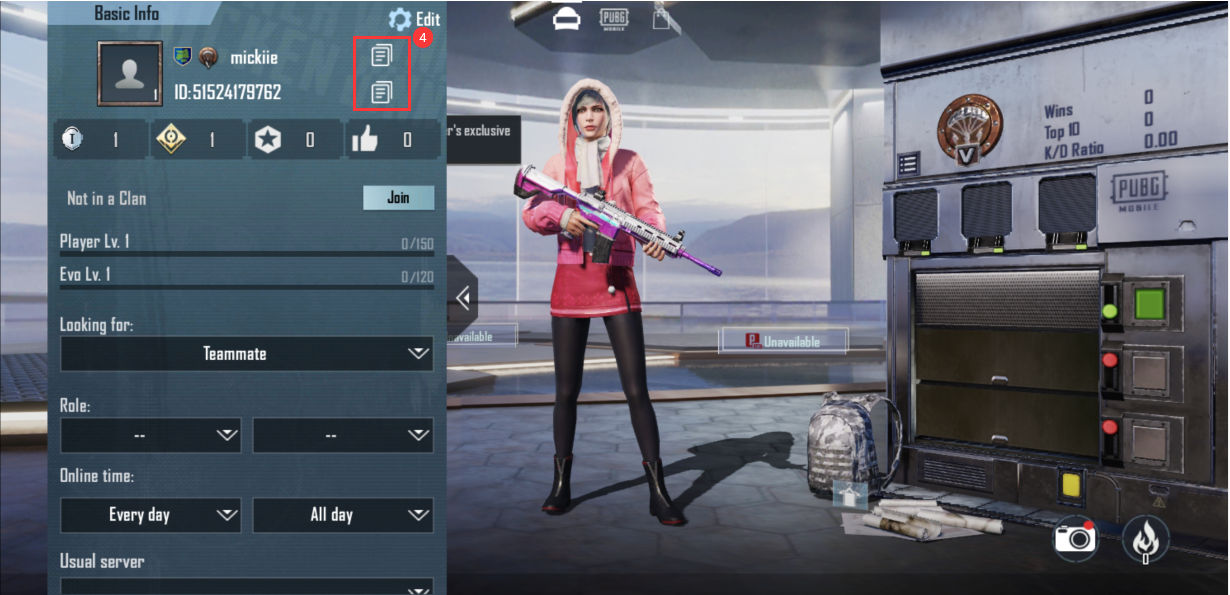
The Player ID is different from your nickname. Make sure you copy the numeric ID, not your display name.
Direct Top Up or UC Voucher?
This page is for a PUBG Mobile direct top up using your Player ID. If you need a code sent to your email instead, choose the PUBG Mobile Global UC voucher.
