logologo
  • Store
  • Events
  • Updates
  • News
    • Loading...
    • Discover
    • Browse
    • Rewards
    • FAQ
    1. Browse
    2. Mobile Game
    3. LifeAfter
    The Heronville Mystery
    LifeAfter

    LifeAfter Top Up

    Prologue: Wasteland Rebirth

    4.74

    'LifeAfter' is a survival mobile game, when the devastating virus swept across countries, order and contract collapsed, where do you go?

    LifeAfter
    Updates
    • Telegram Channel - DearPlayers

    Sitemap
    • Store
    • Catalog
    • News
    • Events
    • Updates
    • Trending Now
    • Promotion
    • Newly Added
    • Latest Update
    • FAQ
    • System Status
    • About Us
    • Get in Touch
    Resources
    • Shopee @Cielolew
    • Join Our Telegram Channel
    • Partnership
    Legal
    • Terms of Service
    • Privacy Policy
    • Refund Policy

    ©2025 CIELOLEW STUDIO (202203102712) (KT0520590-V)
    All Rights Reserved.DearPlayers.com is a registered trademark of Cielolew Studio. All product names, logos, brands, and other trademarks featured or referred to within this website are the property of their respective trademark holders. These trademark holders are not affiliated with Cielolew Studio, nor do they sponsor or endorse our services. Any unauthorized use of these trademarks is strictly prohibited.
    NO.99 Kampung Sungai Kertam, Maran, Pahang, 26500, Malaysia | +60138934345

    DearPlayers Status
    Rate us on Trustpilot
    Brand logo Dearplayers.com

    LifeAfter Credits Top Up & Recharge Malaysia

    Survive and thrive in the post-apocalyptic world of LifeAfter with after payment confirmation Credit top-ups. DearPlayers offers a password-free, and reliable way to get Credits in Malaysia—no registration or login required. Upgrade your gear and build your sanctuary today!

    Why Top Up LifeAfter Credits on DearPlayers Malaysia?

    DearPlayers is the top-up service for LifeAfter top-ups in Malaysia. We ensure a straightforward checkout with processing after payment and checkout details.

    processing after payment
    Your Credits are processed for your account after payment confirmation.
    Password-Free Checkout
    We use checkout payment providers and the available checkout flow so no game password is needed.
    Reward Points & Value
    Earn reward points on every purchase and redeem them for discounts on future top-ups.
    How to Top Up LifeAfter Credits

    1. Enter your User ID.
    2. Select your Server (e.g., MiskaTown, SandCastle).
    3. Select the amount of Credits you want to purchase.
    4. Choose your preferred payment method.
    5. Complete the transaction, and your Credits will be added after payment confirmation.
    NoteNo password, registration, or login required. We only need your User ID and Server to deliver the Credits.

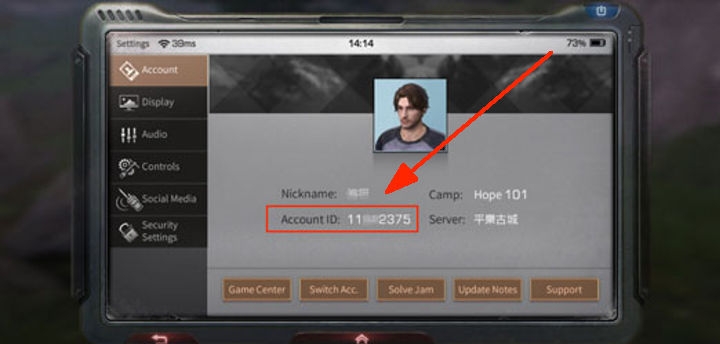
    Where to Find Your User ID

    To ensure your top-up reaches the correct account, please provide your User ID:

    1. Open the LifeAfter game.
    2. Tap on the Settings icon (gear icon) in the top right corner.
    3. Select the Account tab.
    4. Your User ID is displayed there.
    5. Enter this ID accurately in the top-up form. How to find LifeAfter ID
    Verify Your IDPlease double-check your User ID and Server before proceeding. Top-ups sent to the wrong account cannot be refunded.
    Note

    LifeAfter is a survival mobile game where you must gather resources, build shelter, and fight off infected. Use Credits to enhance your survival.

    Game Features & Community

    Top up LifeAfter online for immediate in-game currency delivery to your account. This post-apocalyptic MMO is known for its survival mechanics and the recent introduction of the Cyborg race, adding new strategic depth to player progression. Whether you are hunting for rare materials or strengthening your character, securing the right resources is essential for thriving in the wasteland.

    Ordering is straightforward: enter your Game ID and server name, and the system handles the rest. No password or game login is required, ensuring a secure and quick transaction. Prices are displayed in MYR, allowing you to compare value easily. We support popular local payment methods like Touch n Go, Duit Now, and ShopeePay, making it convenient to pay for your LifeAfter top up using your preferred digital wallet.

    • In-Game Currency: Instant delivery of gold and other essential resources directly to your account.
    • Convenience: Fast, automated processing with no need to share your game password.
    • Local Support: Pay with Boost, GrabPay, or Store Credit using familiar Malaysian payment channels.

    Recent Changes

    LifeAfter introduces the Cyborg race, marking a major expansion after five years. The update features a new post-apocalyptic chapter with the 'Twin Deadlands' area. Players can engage in 'Scavenge & Refit' mechanics to rebuild with scrap metal and cross critical thresholds to wield life as a weapon.

    Frequently Asked Questions (FAQ) - LifeAfter Credits Malaysia

    What are LifeAfter Credits?

    Credits are the premium currency in LifeAfter. They are used to purchase outfits, furniture, materials, and other items in the Mall.

    How do I top up or recharge Credits in Malaysia?

    1. Enter your User ID.
    2. Select your Server.
    3. Choose the amount of Credits you want.
    4. Choose a payment method shown at checkout for your region and order amount.
    5. Complete the payment to receive your Credits after order processing.

    What is the difference between top up and recharge?

    For LifeAfter Credits, "top up" and "recharge" mean the same thing: adding Credits to your account. DearPlayers supports both terms and delivers after payment confirmation either way.

    Is 'topup' the same as 'top up' for LifeAfter?

    Yes. "Topup" and "top up" mean the same for LifeAfter Credits: adding Credits to your account. Use either spelling when looking for; DearPlayers delivers after payment confirmation.

    Is LifeAfter top up cheap?

    DearPlayers offers transparent pricing with no hidden fees. You also earn reward points on every purchase for discounts on future top-ups, giving you more value over time.

    Where can I find my User ID?

    Open LifeAfter, go to Settings (gear icon) -> Account. Your User ID is displayed there.

    Do I need to select a server?

    Yes, you must select the correct server where your character is located (e.g., MiskaTown, SandCastle).

    How fast is the processing?

    orders are processed after payment confirmation! Your Credits are added after your payment is confirmed.

    What payment methods are available at checkout?

    Choose a payment method shown at checkout for your region and order amount.

    Do I need to register or log in to top up?

    No. You can top up as a guest. No registration or login is required—just enter your LifeAfter User ID and Server, choose your package, and pay. Your Credits are processed after payment confirmation.

    Do I need to provide my password?

    No. We only need your User ID and Server to process the top-up. Never share your password with anyone.

    Is DearPlayers password-free?

    Yes, DearPlayers is a password-free checkout option. We use the available checkout flow to ensure your password-free checkout.

    What can I buy with Credits?

    You can buy fashion outfits, weapon skins, furniture for your manor, and special resource packs.

    Can I get a refund if I entered the wrong ID?

    Unfortunately, top-ups sent to the wrong account due to incorrect ID entry cannot be refunded. Please double-check your User ID and Server before paying.

    Can I top up for a friend?

    Yes! Just enter your friend's User ID and Server, then complete the payment.

    Is there a limit to how many Credits I can buy?

    There may be daily limits for security. If you need a large amount, please contact our support team.

    Why are my Credits not showing up?

    Check your payment status first. If successful, restart the game. If they still don't appear, contact our support team.

    Do I earn reward points?

    Yes! You earn DearPlayers reward points for every purchase, which can be used for discounts on future top-ups.

    Does this work for all servers?

    This service works for most LifeAfter servers. Please check the server list in the top-up form.

    How do I contact customer support?

    Contact support with your Order ID if you need help after payment.

    Are there any hidden fees?

    Available payment methods are shown at checkout and may vary by region, order amount, and channel.

    Can I use this for LifeAfter: Nightfall?

    This service is generally for the global/SEA version of LifeAfter. Please ensure your account is compatible.

    Do I need a game account to top up?

    Yes, you must have a valid LifeAfter account to receive the Credits.

    Are the top-ups password-free?

    Yes, all top-ups on DearPlayers are handled through digital checkout flows.

    • Sign In / Register
  • gold coin
  • Sign In